


Legal Text Collector
4.0294.00 Reviews
App Specs
- Version
- 2.24.2
- Updated On
- License
- Free
- Downloads
- 100,000+
- Developer
- Legal Text Collector
- Categories
- Communication
- Platform
- Android
Screenshots
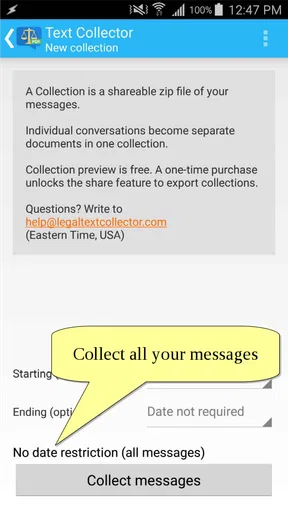
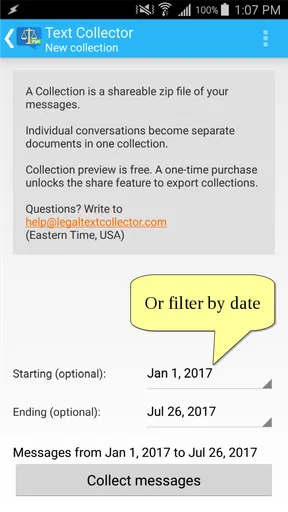
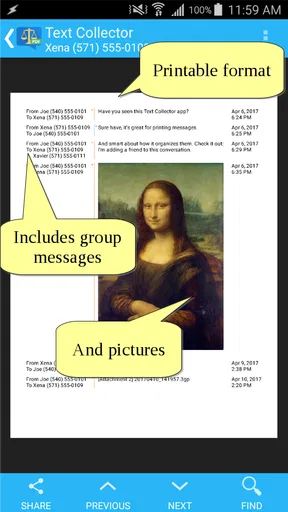
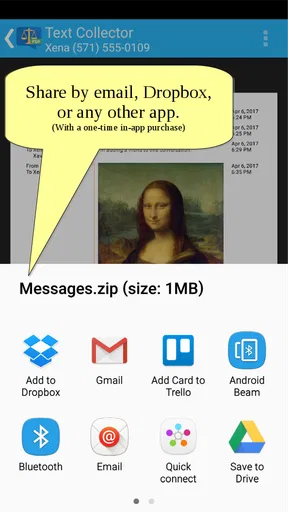
 Analysis by AppCompare
I like tools that solve one narrow problem without pretending to replace an entire communication system. Legal Text Collector takes that approach: it is an Android communication app built around saving messages as PDF files. After using it, my view is that its value depends less on everyday chatting and more on whether you occasionally need a clean, portable record of important text conversations.
That makes it easier to recommend to a specific person than to everyone. If you need to preserve messages for a complaint, a work handover, a family matter, or your own records, the app can be practical. If you simply want to back up chats, search a long conversation, or move messages between devices, the usual tools built into your messaging service may be more convenient.
What the app does well in real situations
The central idea is straightforward: turn messages into a PDF that can be kept, printed, or shared through the normal options available on an Android device. I found that focus useful because a PDF is easier to treat as a finished document than a series of screenshots. Screenshots can be scattered across a gallery, cropped inconsistently, or difficult to read later. A single document gives the conversation a more deliberate form.
A realistic example is a dispute with a service provider. Instead of sending several images from a chat and asking someone else to reconstruct the order of events, I could prepare one message record and keep it with the related emails or receipts. The same workflow makes sense for a landlord conversation, a school arrangement, an appointment discussion, or a work exchange that needs to be passed to another person.
The app is also useful when the recipient does not use the same messaging platform. A PDF does not require the other person to install the original chat app or understand its export format. That portability is the strongest reason to use it. The result can be opened on a phone or computer with ordinary document software, which is more flexible than leaving the conversation trapped inside one service.
Its developer is Legal Text Collector, a name that makes the intended use clear without requiring much explanation. I would not treat the app as a complete legal-record system, though. Creating a PDF is not the same as proving that a message is authentic, preserving every piece of technical metadata, or establishing a formal chain of custody. The app helps organize readable text; it should not be mistaken for specialist evidence software.
The current version is 2.24.2, and the app supports Android devices starting with version 4.4. That compatibility is helpful if you are working with an older phone, especially when the device is used as a dedicated record-keeping tool rather than as a modern daily handset. I would still test the workflow with a non-sensitive conversation first, because older Android interfaces can handle sharing and document storage differently from newer ones.
Worth Reading Before You Choose

EA SPORTS FC Mobile 26 Is a Bigger Football Game, but It Takes Time

Flipboard Shows What News Apps Must Do Beyond the Feed

Switching to Android Auto Means Rethinking Your Driving Routine

Google Calendar Makes a Crowded Week Easier to Manage

Ludo King Makes the Most of the Minutes Between Plans

Baby Panda World Brings Quick Play to Modern Phones, but Its Game Library Feels Busy
A better workflow than taking endless screenshots
My preferred approach is to prepare the material before creating the document. I would first identify the exact part of the conversation that matters, remove unrelated exchanges where possible, and check that names, dates, and replies are readable. A shorter record is easier for another person to understand than a huge export containing every casual message.
That preparation is one of the app's less obvious strengths: it encourages you to think about the purpose of the record. A PDF intended for your own archive can include more context. One being sent to a manager, mediator, or support team should be focused and easy to follow. The app handles the conversion, but the quality of the final record still depends on what you choose to preserve.
I also recommend opening the finished PDF immediately after creating it. This simple check catches practical problems before the file matters: a missing section, an unreadable page, an awkward break, or a document saved somewhere you cannot find later. Do not assume that a successful conversion automatically means a useful record. Reviewing the output is part of the process.
Another sensible habit is to rename the file clearly rather than relying on an automatically generated name. Include the subject and the date in a way that makes sense to you, then store it with related documents. This is especially useful when several conversations concern the same issue. The app creates the document, but a consistent filing system makes the result genuinely valuable months later.
Where it compares favorably with ordinary alternatives
Most messaging apps already offer some form of backup, forwarding, or conversation export. Those options are usually better when your goal is to restore a chat inside the same service or retain a large conversation for personal reference. They may also preserve the original structure more naturally than a PDF.
Legal Text Collector makes more sense when the final destination is a human reader who wants a document, not an app database. A support agent may prefer an attachment that opens immediately. A family member helping with an issue may not want to install another messaging platform. A printed copy may be more convenient than a phone screen. In those cases, the PDF format is the point, not a compromise.
It also has an advantage over screenshots when presentation matters. Screenshots are quick, but they often force the reader to zoom, swipe, and remember the order of separate images. A document is easier to label, archive, and send as one item. I would still use screenshots as a secondary reference when visual context is important, because a PDF made from text may not communicate everything that the original conversation interface showed.
Compared with a general note-taking app, this tool has a narrower purpose. A note app is better for adding explanations, checklists, or a timeline around the messages. This app is better when the main task is producing the message record itself. For a complicated case, I would use both: create the PDF, then keep a separate note explaining what happened and why selected messages matter.
The limitation that matters most
The narrow focus can become friction if you expect a full conversation-management suite. This is not the app I would choose for advanced searching, collaborative annotation, cloud-based case management, or a polished archive shared among several people. Its usefulness ends close to the moment the PDF is created and saved.
That boundary is not necessarily a flaw, but it changes the buying decision. People who want an all-purpose communication backup may find the app too specialized. People who need a quick document may appreciate that it does not bury the main task under unrelated features. I see it as a utility to keep available for occasional situations, not as an app I would open every day.
There is also a responsibility issue around sensitive messages. A PDF can be easier to forward than the original conversation, so I would treat every generated file as a separate copy that needs care. Avoid sending it to the wrong contact, check the attachment before sharing, and remove old copies when they are no longer needed. The app makes text portable, and portability always increases the chance of accidental distribution.
The optional purchase model is worth noticing. The app is free to install, while in-app purchases are listed at $2.49 per item. That means I could try the basic workflow before deciding whether any paid item is worthwhile. I would not pay automatically just because the subject sounds formal; first I would confirm that the free experience produces the kind of document I actually need and that the additional purchase addresses a real limitation for my use.
Its age rating is Everyone, which fits a utility for handling text rather than an entertainment app. Still, an age label does not make every conversation appropriate to share. The responsibility comes from the content you process, not from the rating. I would be particularly careful when a record includes another person's phone number, address, health information, or private family discussion.
Who should use it, and who should skip it
I think it is a good fit for someone who occasionally needs to turn messages into a readable document without learning complicated desktop software. It may suit a small business owner keeping customer exchanges, a tenant organizing a maintenance discussion, a parent preserving arrangements, or anyone who needs to present a conversation outside its original app.
It is also a reasonable choice for users with older Android phones. The minimum operating system is Android 4.4, so the compatibility range is broader than many newer utilities. That does not guarantee identical behavior on every device, but it does make the app relevant to phones that are no longer comfortable running large modern applications.
I would skip it if your main need is automatic, continuous backup. A one-purpose PDF tool is not a replacement for the backup system of a messaging platform. I would also look elsewhere if you need to preserve voice messages, attachments, reactions, account details, or technical information as part of a formal investigation. A readable text document may be useful evidence for context, but it is not automatically a complete record of everything that happened.
Another group that may not benefit much is anyone who only wants to save a few memorable messages. For that, a screenshot or a copied note could be faster. The app earns its place when the conversation is long enough, important enough, or awkward enough that separate images would create more work for the person reading them.
What the audience response suggests
Legal Text Collector has passed one hundred thousand installs and holds a 4.0 average from around five hundred ratings, with nearly three hundred written reviews. I read those figures as a sign of a useful but specialized tool rather than a universal favorite. The audience is large enough to show that the problem is real, while the moderate average reminds me not to expect a perfect experience on every device or workflow.
For me, that balance matches the app itself. It is easy to understand, but the surrounding task can still require care. Selecting the right messages, checking the output, naming the file, and storing it safely are all part of getting a good result. Someone looking for a magic button may be disappointed; someone willing to manage those steps can get a practical document from a focused utility.
The written feedback count also makes the app feel established enough to consider, but I would still judge it by my own use case. A person exporting occasional text for a complaint may value it much more than someone expecting a complete archive. The rating is useful context, not a substitute for deciding what kind of record is required.
My verdict after weighing the trade-offs
Legal Text Collector is best understood as a document-making tool for message records, not as a replacement for a chat app or a full evidence platform. I like its clear purpose and the practical advantage of receiving one portable PDF instead of a confusing pile of screenshots. The strongest use cases are occasional but important: organizing a conversation, sharing it with someone outside the original service, and keeping a readable copy for later.
Its weaknesses are equally clear. It is specialized, so it will feel unnecessary if your messaging app already provides the backup or export format you want. It also cannot remove the need for judgment: you still have to decide what belongs in the record, inspect the result, and protect the finished file. For formal legal work, I would pair it with a more rigorous process rather than relying on it alone.
Because it is free to start, supports older Android versions, and has a straightforward purpose, I would recommend trying it if you have a specific message-to-PDF task in mind. I would not install it expecting a daily communication companion. For the right reader, though, that narrowness is precisely why it works: when an important conversation needs to become a clean document, this app gives the job a dedicated place.
Pros
- Quickly gathers legal text from supported documents and web pages.
- Useful for organizing clauses
- citations
- and compliance references.
- Simple interface with minimal setup for occasional users.
- Can reduce manual copying and the risk of transcription errors.
- Helpful for reviewing large amounts of legal content efficiently.
Cons
- Accuracy may vary with scanned documents
- poor formatting
- or unusual layouts.
- Advanced legal analysis and interpretation are not provided.
- Supported file types and extraction sources may be limited.
- Sensitive documents may raise privacy concerns during processing.
- Results should be checked manually before use in legal work.
FAQs for Legal Text Collector
What is Legal Text Collector, and what is it used for?
Legal Text Collector is a productivity tool designed to help users gather, organize, and manage legal text or document-related information in one place. It may be useful for researchers, students, legal professionals, and anyone who needs to collect references efficiently. Before downloading, review the app’s current description and supported features to confirm that it matches your workflow and the type of legal material you intend to manage.
Is Legal Text Collector suitable for professional legal work?
The app can be helpful for collecting notes, excerpts, references, or other legal information, but it should not automatically be treated as a complete professional case-management or legal-research system. Its usefulness depends on the available organization, search, export, and backup tools. Always verify important information against official legislation or trusted legal sources, and avoid relying on the app alone for legal advice, filings, deadlines, or compliance decisions.
Does Legal Text Collector require an internet connection?
Whether an internet connection is required depends on how the application stores and processes collected content. Basic local note-taking or saved text may work offline, while downloading source material, synchronizing data, accessing online references, or using account-based features may require connectivity. If offline access is important to you, check the latest store listing and test the app’s behavior before relying on it during travel, court preparation, or other situations without stable internet.
How does Legal Text Collector handle privacy and sensitive legal information?
Users should be careful when entering confidential case details, personal data, client information, or unpublished documents into any collection app. Before using Legal Text Collector for sensitive material, read its privacy policy, permissions, storage information, and terms of service. Check whether data is stored locally or synchronized to external servers, whether backups are encrypted, and whether account deletion removes stored content. Avoid uploading confidential information unless the app’s security practices meet your requirements.
Is Legal Text Collector free to download, and are there in-app purchases?
The availability and pricing of Legal Text Collector may vary between Android and iOS, as well as by region and app version. The application may be free to install while offering optional purchases, subscriptions, premium tools, or limits on storage and functionality. Check the official Google Play or App Store listing for the current price, payment terms, trial conditions, and cancellation policy before downloading, particularly if you plan to use it regularly.


